Linebound Tool · Version 2.1
Flight Training Financial Planner
A Microsoft Excel workbook for managing the money side of professional flight training over a period of up to sixty months. Training costs, household income and spending, cash, your protected reserve, funding and debt — one plan, one set of months.
It holds three things at once and keeps them connected: the plan you committed to, what has actually happened since, and where the plan now lands given both.
- Excel .xlsx, macro-free · up to 60 months
- Four numbers a month · six working sheets
- No subscription, no account, no bank connection
One-time purchase, delivered as an instant download through Etsy. No subscription, no Linebound account, no sign-in.
At a glance
- Format
- Excel .xlsx, macro-free
- Horizon
- Up to 60 months
- Visible sheets
- Start Here + six working sheets
- Monthly upkeep
- Four numbers, one dropdown
- Documentation
- Quick Start + User Guide
- Requires
- Microsoft Excel on a computer
Runs locally. No bank connection, no sync. Nothing you enter is sent to Linebound.
Macro-free. Nothing to enable or allow.
Every date, cost, rate and pace is yours to set.
One-time purchase, no recurring fee.
Nothing in the workbook assumes a loan.
A quote tells you what a rating costs. It does not tell you whether you can finish.
A training quote does not tell you whether your household can still finish the path when the pace slips, the income changes, a stage runs long, or funding arrives later than expected.
Those things are connected, and the connections are easy to lose track of. Flying fewer hours in a month costs less money and buys less progress at the same time. A stage that runs three months long does not cost more on its own, but it changes when that money leaves your account.
Held in your head, or in a spreadsheet that only tracks tuition, effects like these are invisible until they are large. This workbook keeps them in one place and does the arithmetic. You record four numbers a month; it does the rest.
Who it is designed for
Pilots who have moved past deciding and into managing: a real path, real dates and real money to coordinate.
Career changers coordinating training with an existing household and income
Working students flying around a job
Full-time students with living costs still running
People on multi-certificate professional tracks
People already partway through training
Households planning the transition together
It works the same whether you are funding training from savings, from family support, from a loan, or from a combination.
How it works
Plan → Track → Compare → Forecast
01
Plan
Build the plan you are committing to on My Plan, Training Plan and — if it applies — Funding & Loans. Set it once. It is kept as your original record.
02
Track
Once a month on Monthly Check-In, record what actually happened: household take-home, household spending, training spending and flight hours. Then mark the month Done.
03
Compare
The Dashboard reads your latest closed month against what the plan expected, and shows how far the plan has moved since.
04
Forecast
When something changes, update Outlook, Training Plan or Funding & Loans. The projection moves. My Plan does not.
What you committed to
Original Plan
My Plan, the Original columns of Training Plan, and the Original Plan column of Funding & Loans. Set once, then left alone.
What has happened
Actuals
Monthly Check-In, one row per month. Counted only once a month is marked Done.
What you now expect
Current Outlook
Outlook, the Expected columns of Training Plan, and the Current column of Funding & Loans.
The result
Current Forecast
Closed actuals are run first; the projection continues from that point on your current assumptions.
A plan you continually revise tells you nothing, because you can no longer see how far it has moved. This workbook fixes the baseline on purpose. The distance between the two is the information.
The Dashboard
Where you stand, and where the plan is headed
What happened
Your latest closed month in five rows — take-home, spending, training spending, hours, net — each showing Plan, Actual and Difference.
Where do I stand
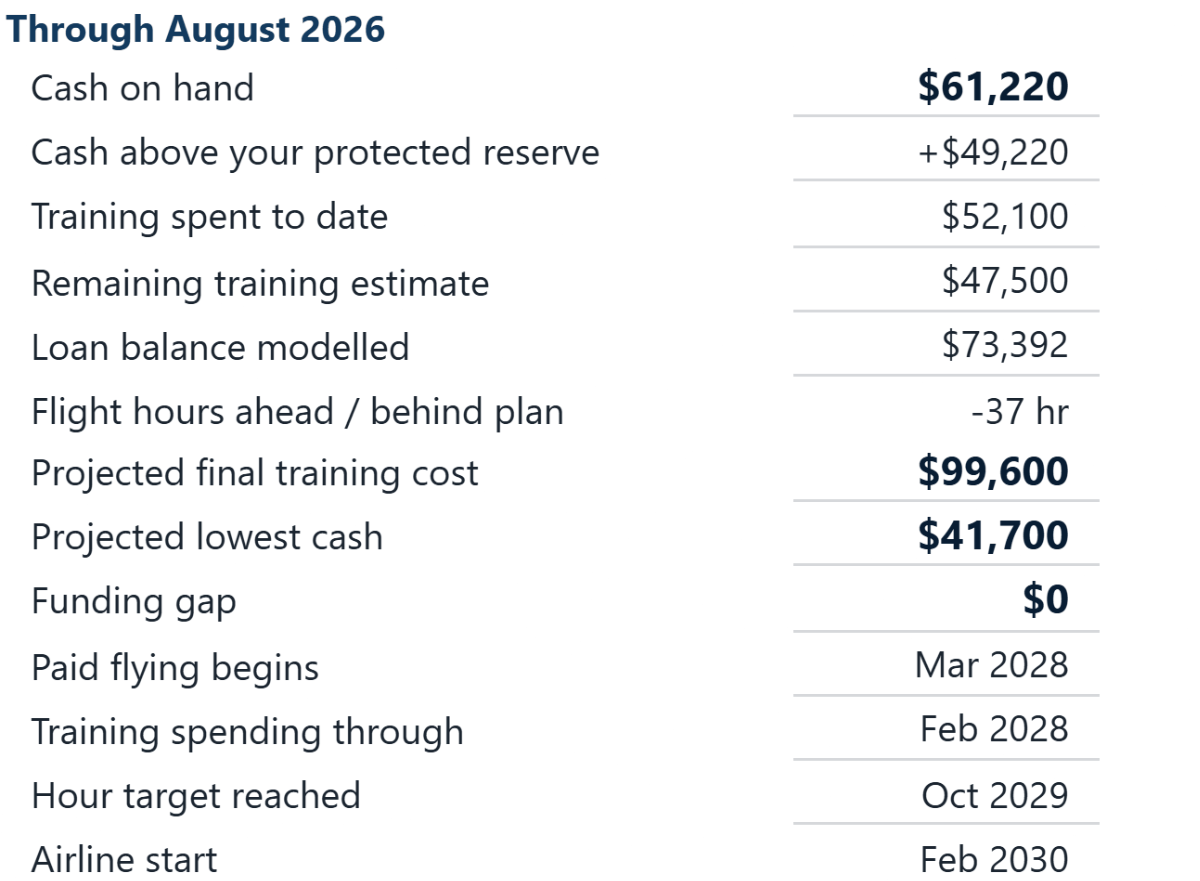
Cash on hand, cash above your protected reserve, training spent to date, remaining estimate, loan balance modelled, and hours ahead or behind plan.
Where am I headed
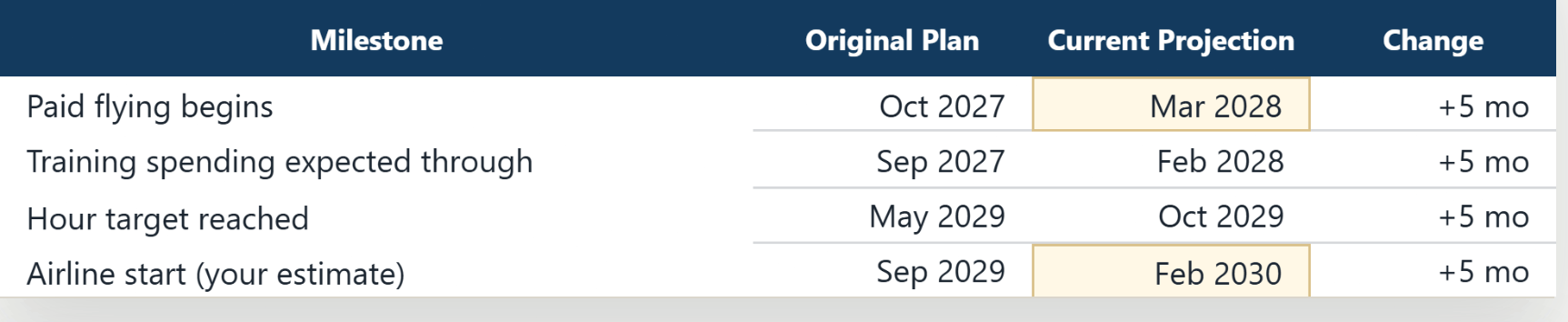
Projected final training cost, projected lowest cash, the funding gap against your reserve, and four projected dates.
How different from my original plan
Hours ahead or behind, time ahead or behind to your hour target, and your 60-month position — cash less outstanding planner debt — against the Original Plan.
It writes your position in sentences
Below the figures, the workbook describes where you are in plain language: how many months you have closed, how your hours compare, when you now reach your hour target and how that has moved, whether training is projected over or under budget, and where your projected cash sits relative to your reserve. If something needs correcting, that message appears first, and it names the specific thing that is missing.
Three charts
Cash outlook (modelled month-end cash) · Cumulative training cost · Cumulative flight hours. Each plots Original Plan against Current Outlook over a twenty-four-month window positioned around where you are now.
Inside the workbook
Start Here, then six working sheets
Every cell you are meant to fill in is gold. White cells are calculated for you. Sheets are protected to help prevent accidental changes to calculated cells — normal use never requires removing protection.
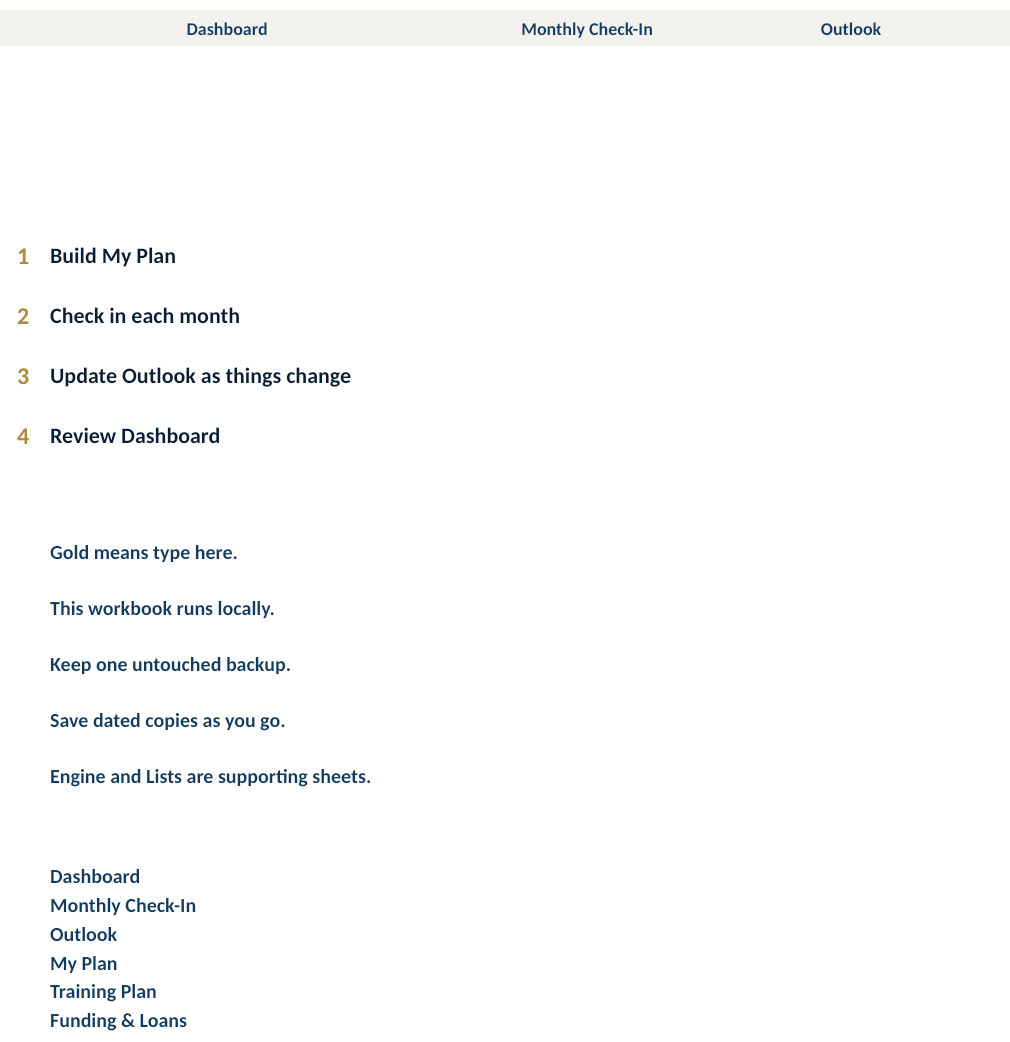
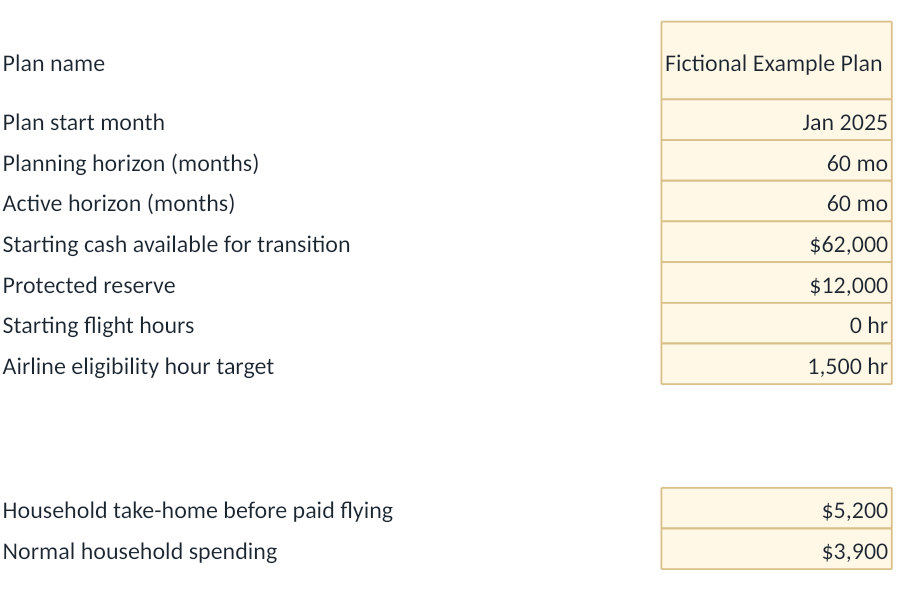

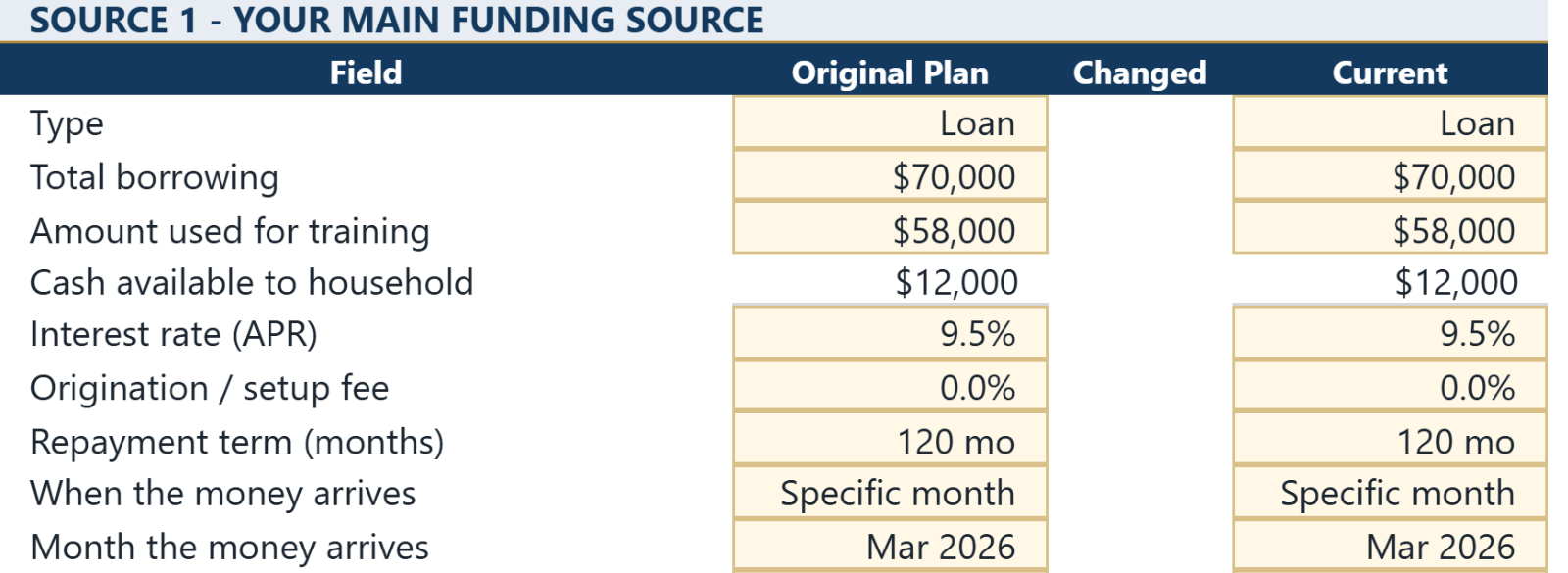
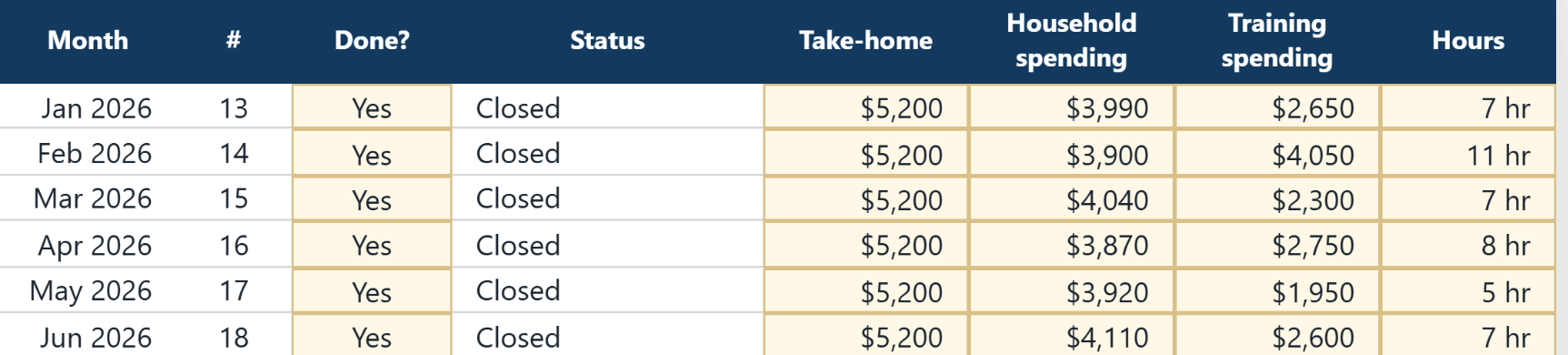
Two further sheets, Engine and Lists, hold the calculations and the dropdown values. They require no normal user interaction — nothing in the monthly routine asks you to open them.
Example figures from a fictional plan.
The monthly routine
Four numbers and one dropdown
Find the row for the month due, enter what actually happened, and set Done? to Yes. The workbook fills in the rest of the row. That is the whole routine.
Blank is not zero. If you genuinely flew nothing or spent nothing on training that month, type 0 — a blank holds the month open.
Gold — you type here
Take-home
What the household actually brought home, after tax.
Gold
Household spending
What the household spent, not counting training.
Gold
Training spending
What actually went to training, whoever paid it.
Gold
Hours
Flight hours actually flown that month.
Dropdown
Done? → Yes
Closes the month, if all four actuals are present.
White — calculated
Net · cash · hours · status
Filled in for you.
What you receive
- The workbook. One Microsoft Excel file, macro-free .xlsx, covering sixty months from your plan start month.
- Quick Start (PDF). Everything you need to open the workbook and start using it correctly.
- User Guide (PDF). Seventeen sections: every sheet, every field, common workflows, how to read unusual results, and how to correct mistakes.
- LICENSE and README. The licence terms for personal use, and a short file-list readme.
Both guides are illustrated throughout with figures from one fictional example plan.
What you need
- Microsoft Excel on a computer. Other spreadsheet applications are not guaranteed — the workbook uses sheet protection, data validation, conditional formatting, charts and internal links.
- Nothing else. There is nothing to install, enable or allow.
- Your own figures. Cash on hand, household take-home and spending, the ratings you intend to take, and what each was budgeted to cost.
- A backup habit. The workbook asks you to save one untouched copy before you enter anything, and dated copies as you go.
Being clear about this up front will save you time
What it does not do
It does not predict anything
Every date, cost, rate and pace is a figure you enter. Projected completion, cash, dates and costs are the arithmetic of your assumptions — not Linebound forecasts.
It is not a logbook
It records monthly flight-hour totals for financial and progress tracking. It does not record flights, aircraft or endorsements.
It does not connect to anything
No bank feed, no sign-in, no sync. You enter the numbers.
It does not split spending by stage
One training-spending figure per month. That is deliberate: it is what keeps the monthly routine short enough to actually do.
It does not calculate tax
Household figures are take-home, after tax.
One plan per file
The workbook holds one Original Plan and one Current Outlook at a time. To test a second scenario, save a copy and change the assumptions there.
Two tools, two jobs
Choosing the right tool for where you are
Still deciding
Pilot Career Change Calculator
Free. For stress-testing whether the career change works financially before you commit to a path.
Open the calculatorCommitted and managing
Flight Training Financial Planner
This workbook. For running a real path, month by month, against the plan you committed to.
Buy on Etsy — Flight Training Financial Planner, from the tool comparison. Opens in a new tab.Questions
Before you buy
Do I need Microsoft Excel, or will another spreadsheet app work?
Microsoft Excel on a computer is required. Other spreadsheet applications are not guaranteed.
Is this a subscription?
No. It is a one-time purchase with no recurring fee and no account.
Does it connect to my bank?
No. You enter four numbers a month yourself, and nothing you enter is sent to Linebound.
Do I need a loan to use this?
No. Borrowing is optional. If training is funded entirely from household cash and income, leave Funding & Loans empty. Use it if you are borrowing or receiving outside or non-repayable support — family help, a scholarship, a grant, an employer contribution.
Can I use it if I am already partway through training?
Yes. Set your plan start from where you are now, enter your logged hours and current cash as the starting point, and mark completed stages with an actual finish date and a $0 remaining estimate.
Does it tell me how long training will take, or when I will be hired?
No. Expected dates are your judgement. The workbook projects the financial consequences of the dates you enter, and it does not predict hiring.
Can I run more than one scenario?
Not within a single file. Save a copy under a different name and change the assumptions there — the workbook holds one Original Plan and one Current Outlook at a time.
Is this financial advice?
No. It is a planning tool that performs arithmetic on figures you enter. It is not financial, tax, lending, legal or investment advice.
One workbook, two guides, one purchase
Version 2.1, delivered as an instant download through Etsy. No subscription, no Linebound account, and nothing you enter ever leaves your computer.
The Linebound Flight Training Financial Planner is a personal planning tool. It performs arithmetic on figures you enter. It is not financial, tax, lending, legal or investment advice, it is not a loan offer, and it does not predict hiring. Nothing in it is a guarantee of training cost, duration, completion timing, financing availability, earnings or employment outcomes.